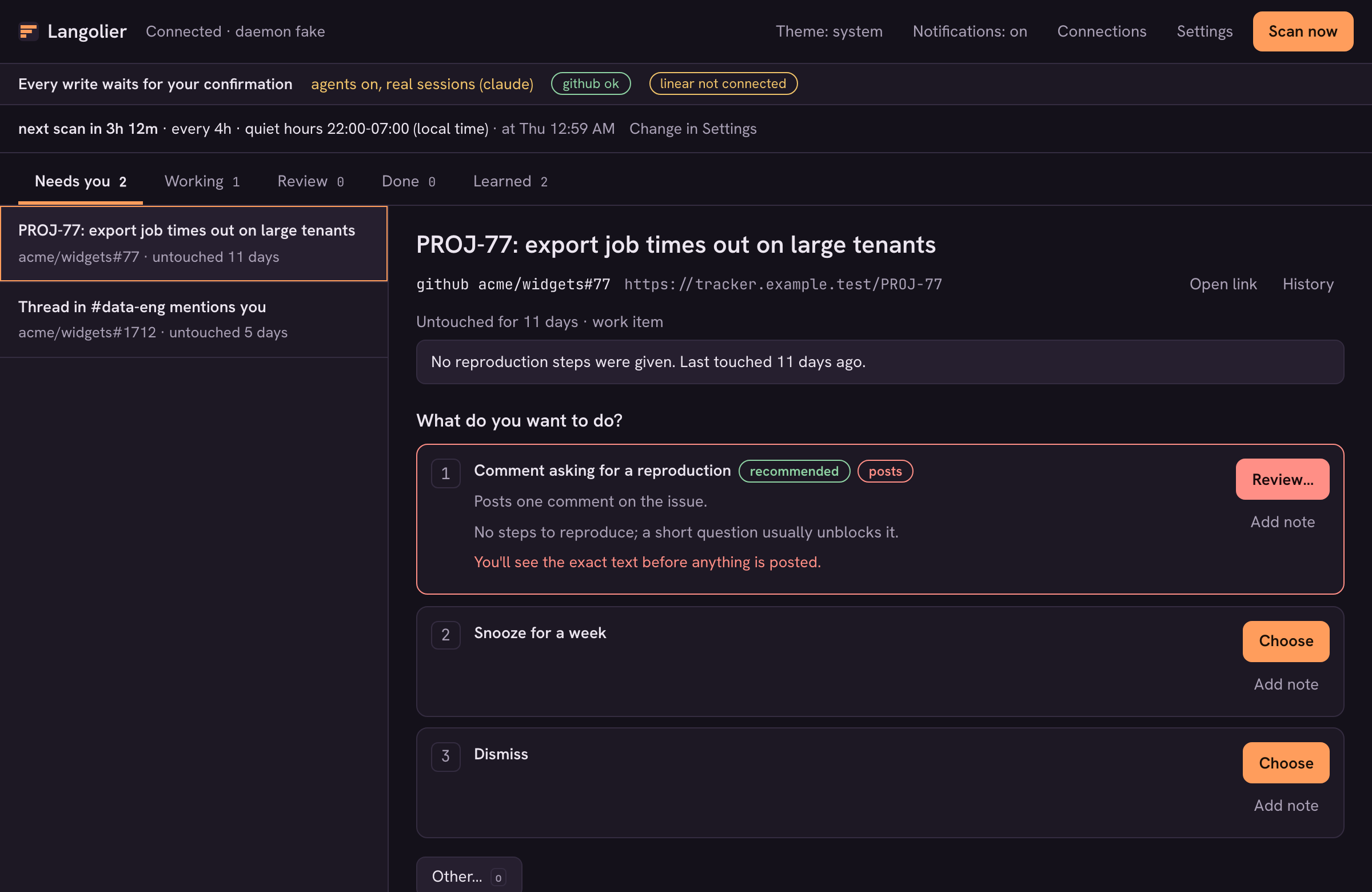
Nothing in your backlog is on fire, which is exactly the problem.
A ticket was assigned to you eleven days ago and you haven’t touched it. A thread in a channel mentions you and wants a reply. A pull request has been waiting on your review since Monday. You focus on a few things each day, and the rest quietly rots. Nothing surfaces, so nothing gets done, until the mess grows large enough to hurt.
I leave work each day with work on my plate that never gets touched. It stays on my mind for the rest of the evening. If I could only make some progress, incremental, even, it’d feel like I did something.
Langolier is a local agent built for that gap. It follows behind you, finds the work you can’t get to, asks what to do about each item, and does nothing until you answer. It works behind you, not instead of you.
Table of contents
Open Table of contents
Where the name comes from
The name comes from Stephen King’s The Langoliers: the langoliers are creatures that devour whatever has already passed. The product is one Langolier, a single one of them, eating the stale backlog behind you. (Before 0.2.0 it was called Langoliers, plural. If you have an older install, the first start moves your data from ~/.langoliers to ~/.langolier and the installer leaves shims under the old command names, so nothing needs doing.)
Find, ask, act, remember
The whole product is one loop:
- Find. A scan reads the open items assigned to you, your mentions, and your requested reviews. Today that means GitHub and Linear.
- Ask. Each item becomes a card: a short summary and a numbered list of options, with a recommended default. You can also write your own instruction.
- Act. Only after you answer, and only with the permissions that option needs.
- Remember. Repeated answers become rules, so the next scan is quieter.
A day with it looks like this. You open the queue and see nine items. One is a ticket untouched for eleven days, with the options add a comment asking for clarification (recommended), snooze a week, or dismiss. Another is a pull request that has waited on your review for three days. You answer in a couple of minutes, the agent does the approved legwork, and the cards move to Review.
The goal is a short queue where every item is worth reading. You answer questions. You don’t groom a board.
Approval-first, down to the exact text
“Ask before acting” is easy to say and easy to water down, so here is what it means in practice.
A scan never writes and never starts an agent session; only a card you answer can. The daemon does every read itself and hands the items to the model as data. The triage agent runs Claude Code with no tools at all, and the daemon enforces that a second time by watching the event stream and killing the run if a tool call appears. Ticket and chat text is treated as untrusted input, never as instructions.
So this is not a read-only tool, and it isn’t a dry run either. Langolier is fully functional as installed: it can post. What it won’t do is post without you. Writes are narrow, and only one exists today: posting a comment on a GitHub issue or pull request. It is on by default and can be switched off per action type, in the app’s Settings screen or with langolierd settings set writes.github.comment off. Every Linear action is unsupported for now; Linear is read-only.
A comment option carries a posts pill, and choosing it opens a confirmation. The app shows the target and every character that will be posted, with the note, “You’ll see the exact text before anything is posted.” The dialog asks “Post this comment?” and has a Post button. Approval is per action, every time.
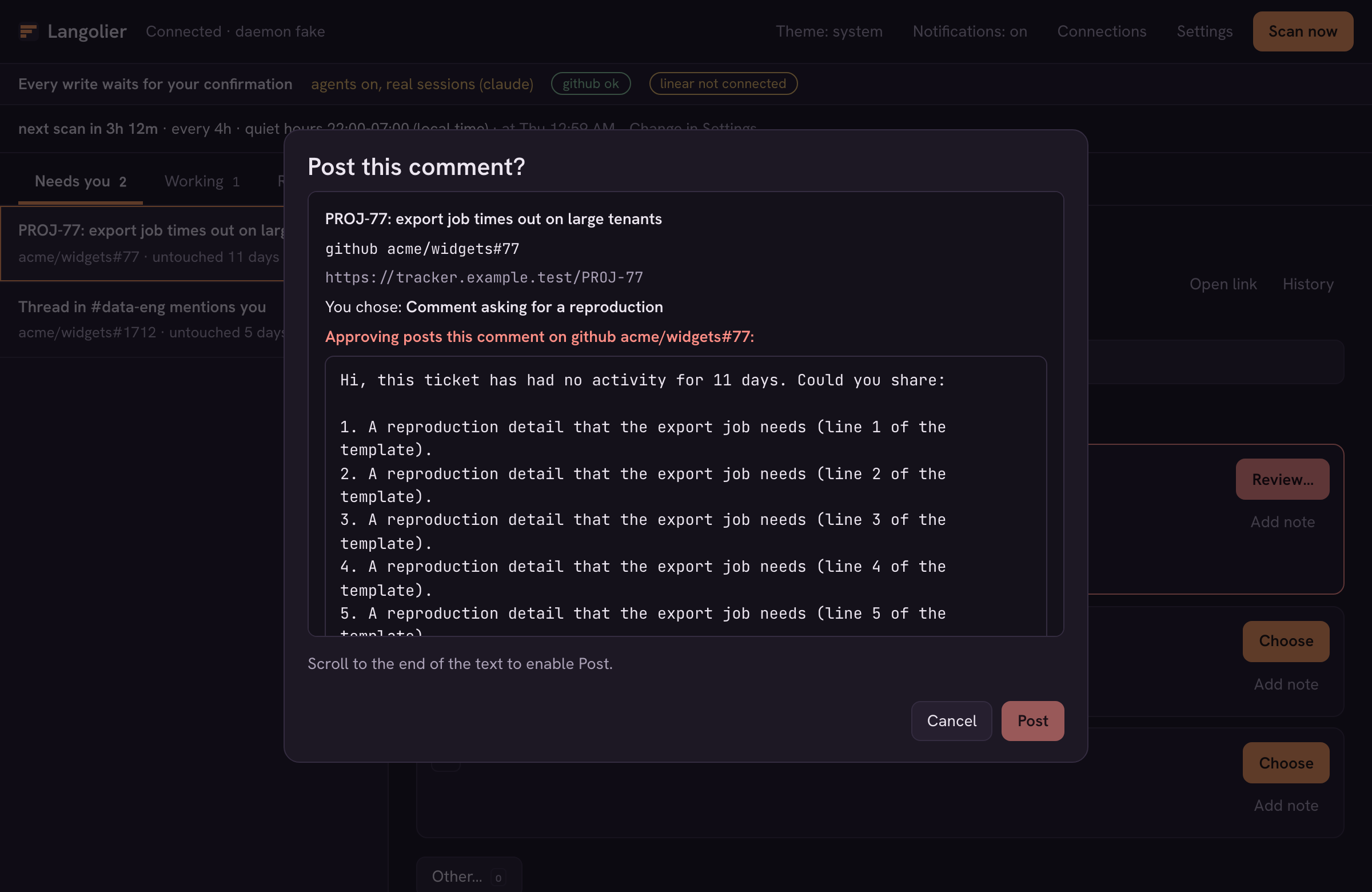
Immediately before posting, the daemon re-reads the item and re-checks that the active gh account is still the one you connected and that the item hasn’t changed since you decided. If it has, nothing is posted and the card goes back to your queue with the reason. A failed post is never retried without a new answer.
Connect and configure in the app
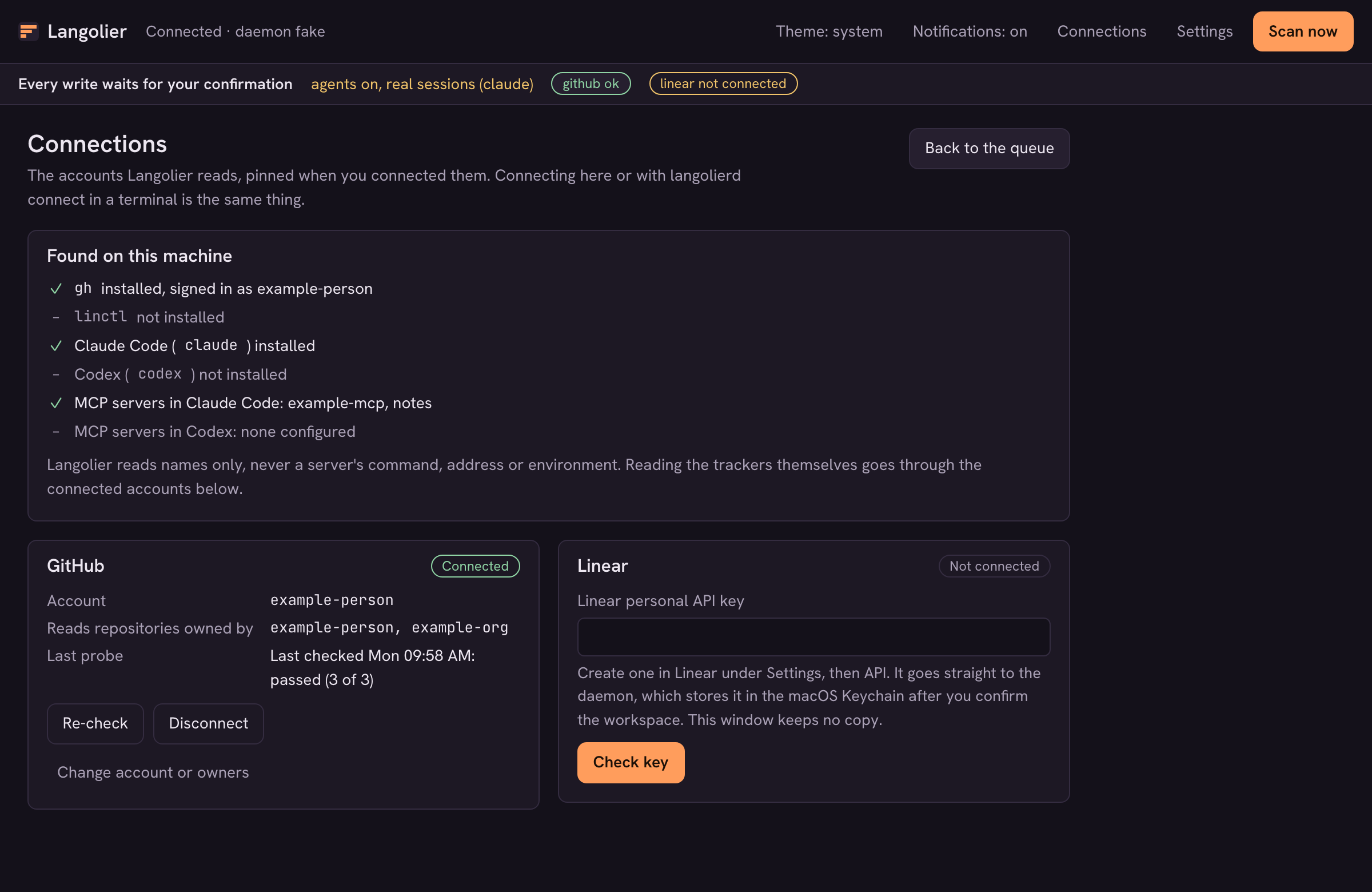
You don’t need the terminal to get set up. The desktop app has a Connections screen: it shows what it found on the machine (gh, Claude Code, MCP server names), and connects GitHub (it shows the exact account and owners first) and Linear (you paste a personal API key into the app, and the daemon stores it in the Keychain after you confirm the workspace it opens). The Settings screen covers comment posting, the scan schedule, and the scan limits, and the daemon checks every value before saving it. There’s no config.json to edit.
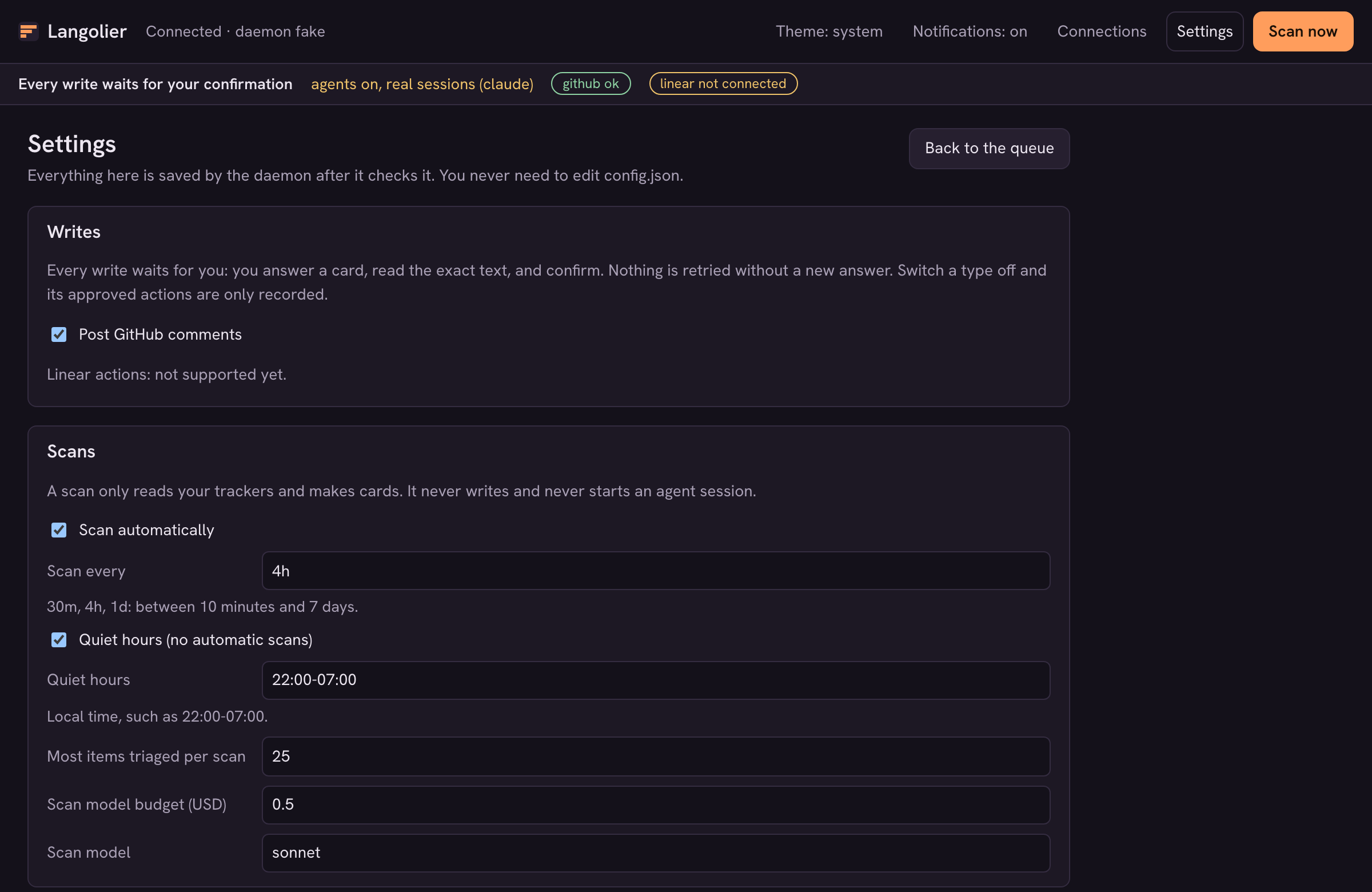
Scans also run on their own: every 4 hours by default, with quiet hours from 22:00 to 07:00, and once right after you connect an account. A scheduled scan is the same read-only scan. It never writes and never starts a session, so the queue fills up while you’re away and nothing happens until you answer. The terminal commands (langolierd connect github, langolierd settings) do the same things, if you prefer them.
Local, and using your own Claude Code or Codex
Langolier runs on your machine. A Rust daemon does the work in the background and a frontend talks to it over a local socket: a terminal UI first, and a desktop app too. Your data and credentials stay local, and every card transition lands in a history you can open.
It doesn’t bring its own model. Agent sessions can run through Claude Code or Codex, using the sign-in already on your machine. When both are installed, Claude Code is the default; choose Codex in Settings (agents.default) or press c on a card. Codex uses your existing codex sign-in from codex login with ChatGPT; API-key logins are refused. Each session receives a short-lived copy of the login without a refresh token, and Langolier deletes it when the session ends. GitHub goes through your gh login, and the Linear key sits in the macOS Keychain. Scans and triage still use Claude Code.
Agent sessions you approve one tool call at a time
Some options start an agent session instead of posting a comment. Follow-up and resume work for both agents. There are two fixed recipes. summarize_diff reads an item and, for a pull request, its real diff, and writes a summary. draft_plan writes a PLAN.md in its own empty directory. Which recipe runs is named by the scan, but the tools, the working directory, and the spending caps come from Langolier and your config, never from the ticket.
Each tool call is approved in the app, inside the same macOS sandbox. Codex has no read tool, so each file read or search needs its own approval. The session can read only its own directory and a short list of system paths.
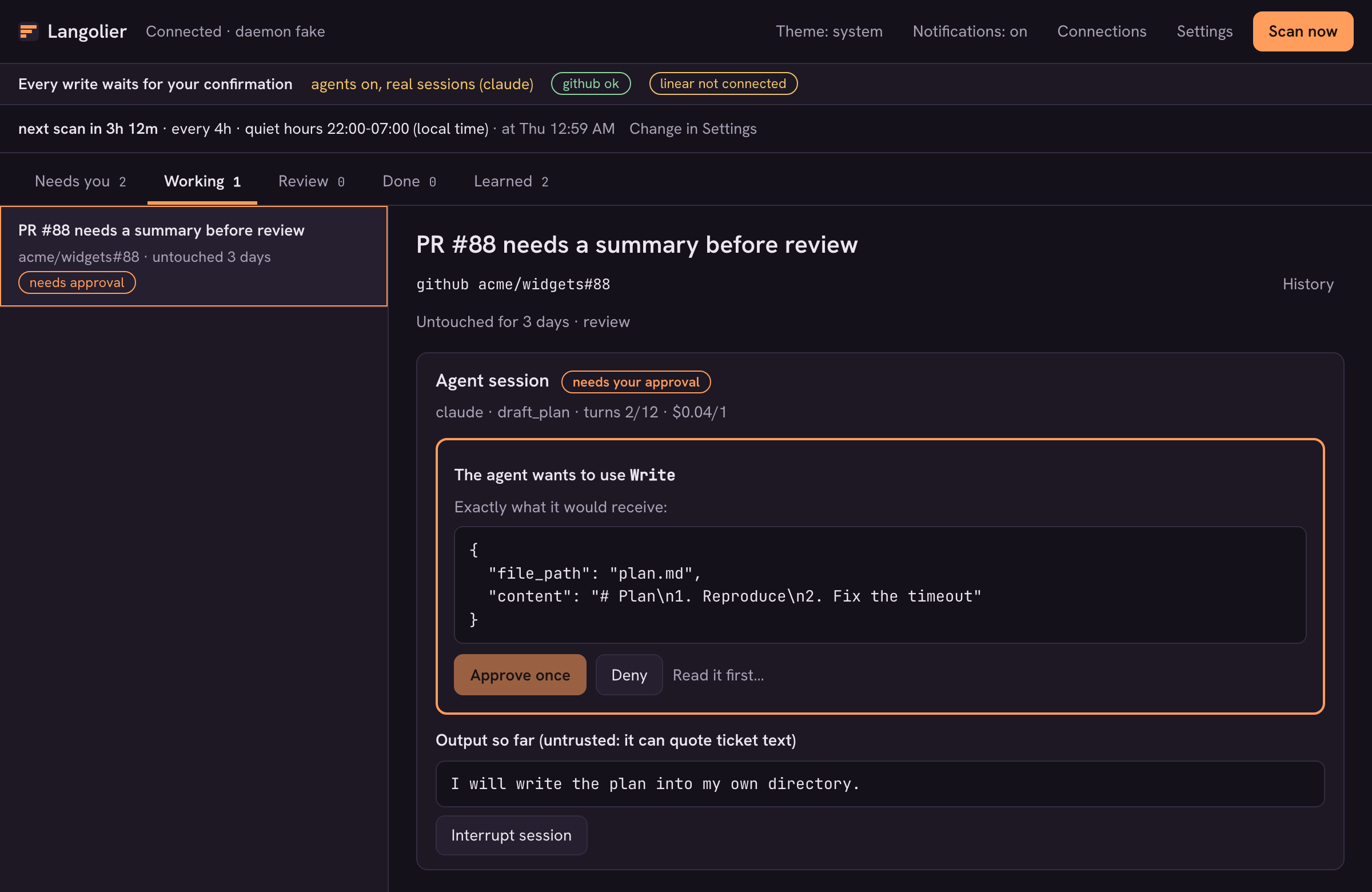
There is no “always allow”. You approve that one call or you deny it, and you can interrupt the session at any point. Claude Code sessions have caps on turns, spend, and minutes. Langolier does not enforce the dollar budget for Codex sessions. A session can still use the network.
Rules that make the queue quieter without a model
This is the part that keeps the queue from refilling. When you answer the same way on three cards that share a repository, an author, or a label, Langolier proposes a rule and shows what it would have matched. Nothing changes until you approve it.
A rule is data, not a script: a fixed set of fields to match, and one action: snooze, dismiss, or prefer an option type. It never contains ticket text and it never posts anything. Each scan applies your enabled rules before triage, so a matching card is snoozed or dismissed with no model call, and its history says which rule did it.
There are also learned checks (what to look at) and recipes (a templated comment, optionally followed by a snooze or dismiss). Both go through the same propose, preview, and approve flow. A recipe’s comment goes through the same approval and exact text confirmation as any other comment.
Where it stands
Langolier is early, and I’d rather you know that before you install it.
- macOS first. The installer targets macOS. There’s no Linux or Windows build.
- Nothing is signed. The binaries and
Langolier.appare not Developer ID signed or notarized. - Writes are narrow. One real write exists (GitHub comments). It’s on by default, and each comment still needs exact-text confirmation. Linear writes aren’t supported yet; Linear is read-only.
- Codex limits. Codex agent sessions are macOS only. The dollar budget is not enforced, and each file read or search needs a separate approval.
- Personal accounts. Connect your own GitHub and Linear accounts.
Connect your accounts from the app’s Connections screen, or with langolierd connect github in a terminal. If you want to look before you commit, langolier --demo runs the whole thing on fake data with a fake agent. It never starts claude, reads no credentials, and contacts nothing.
To install on macOS:
curl -fsSL https://get.langolier.enginyyr.com/install.sh | sh
The installer verifies a SHA-256 before putting langolier and langolierd in ~/.local/bin and the desktop app, Langolier.app, in ~/Applications, with no sudo. Pass --no-app (sh -s -- --no-app) to skip the app. The details are at langolier.enginyyr.com.
Your backlog is going to rot whether or not you look at it. The only question is whether something is keeping watch, and whether it waits for your answer before it does anything about it.